Video Compressor for Discord
Updated June 2026 · Free, runs in your browser, hits 10 MB / 50 MB / 500 MB caps
Discord's free-tier upload cap is 10 MB. A 30-second iPhone clip is usually 50–100 MB, so it gets rejected. This page walks through how to compress your video to land under the cap — in your browser, with no upload to a third-party server, no signup, and no watermark.
Compress your video for Discord →
Discord's file size limits explained
Discord enforces a hard cap on uploaded files. The cap depends on your subscription tier and, for files uploaded inside a "Boosted" server, on the server's boost level.
| Tier | Cost | Upload cap | Notes |
|---|---|---|---|
| Free (default) | $0 | 10 MB | Was 8 MB until 2023, briefly 25 MB, now 10 MB. Applies to ~99% of users. |
| Nitro Basic | $2.99 / mo | 50 MB | Also unlocks custom emoji + higher streaming bitrate. |
| Nitro | $9.99 / mo | 500 MB | The "full" tier — boosts, custom profile, HD streaming. |
| Server Boost Level 2 | server-side | 50 MB | Anyone uploading in that server gets the higher cap. |
| Server Boost Level 3 | server-side | 100 MB | Highest server-level cap. |
The relevant cap is whichever is higher: your personal tier or the server's boost level. Most casual chats fall under the 10 MB free cap.
Compress a video for Discord in 30 seconds
- Open the compressor. Click the button below. The Discord (free) 10 MB preset is already selected — we target 9 MB to leave headroom for the container overhead.
- Drop your video. Drag your file onto the page or use the Choose Videos button. Supports MP4, MOV, WebM, MKV, AVI, and 3GP. Files of any size work — we run locally, so there's no upload step.
- Wait for the bar to fill. The browser reads your file, computes the right bitrate to hit 9 MB, and re-encodes via H.264. A typical 30-second 1080p clip takes 30–60 seconds. A Cancel button is available if you want to stop.
- Download and drop into Discord. The compressed file auto-downloads. Drag it into your Discord chat. It uploads instantly because it's under the cap.
Open the Discord-ready compressor
The compressor opens with the Discord (free) 10 MB preset already selected. Just drop your video.
Or pick a different cap: Nitro Basic (50 MB) · Nitro (500 MB)
Why this works in your browser (no upload)
Most "compress video for Discord" tools you'll find — Clideo, FreeConvert, VEED, Adobe Express — upload your file to their server, compress it there, and let you download it back. That works, but it adds friction:
- You wait for the upload, which is the slowest part on most home internet connections.
- Your video sits on someone else's server long enough for compression to finish, plus whatever retention period the service has.
- Free tiers cap your file size at the upload (Clideo 500 MB, FreeConvert 1 GB) and add watermarks unless you sign up.
This tool runs on your computer — not on someone else's server. The compressed output is built on-device and downloaded straight to you. No upload, no signup, no watermark, no caps.
The simplest test: disconnect from Wi-Fi after the page loads — the compressor keeps working.
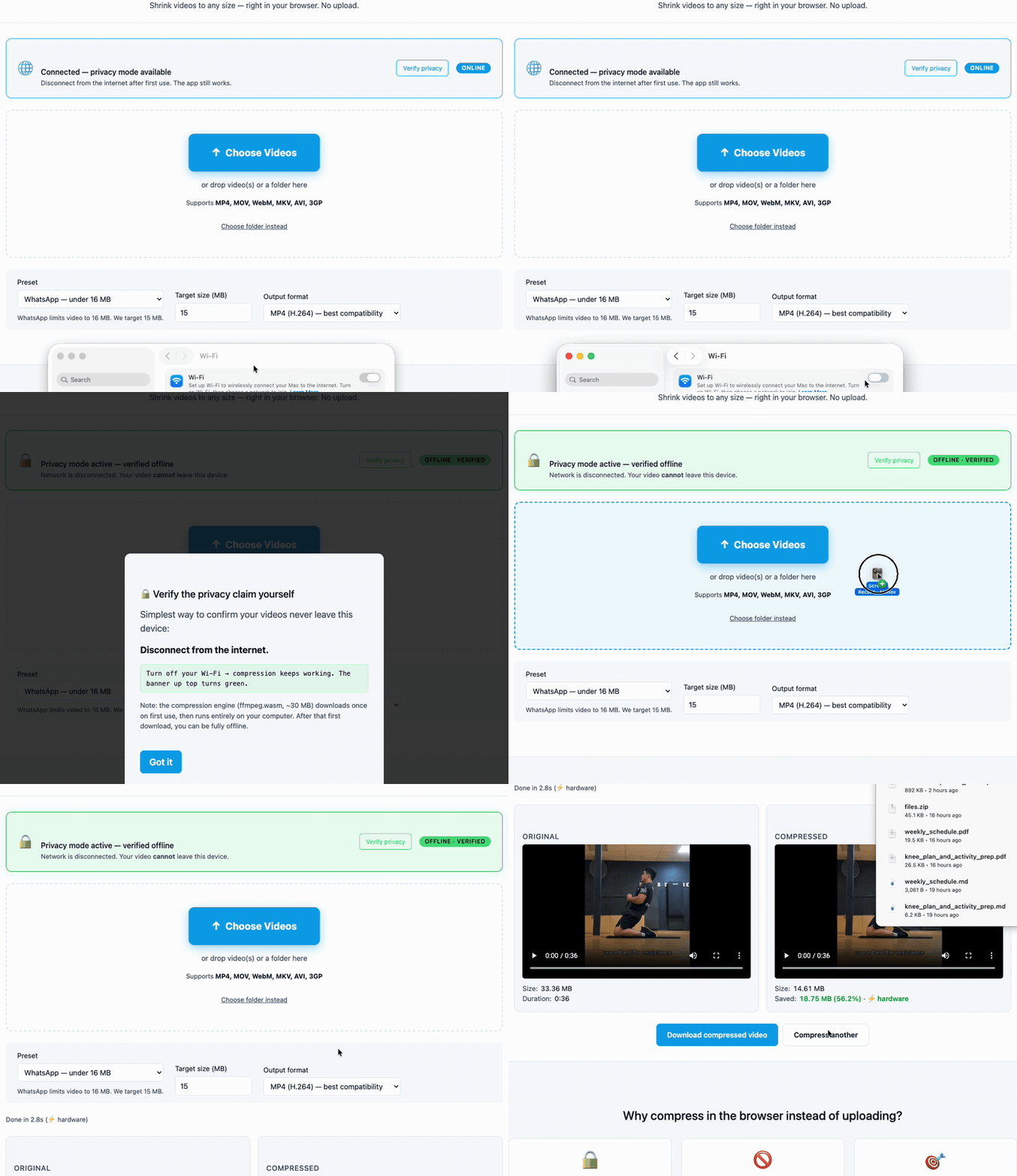
How we compare
| This tool | Clideo | FreeConvert | VEED.io | |
|---|---|---|---|---|
| Video uploaded to a server | No — runs locally | Yes | Yes | Yes |
| Free tier file-size cap | None | 500 MB | 1 GB | 1 GB then signup |
| Watermark on free tier | Never | Yes | Yes | Yes |
| Signup required | Never | Yes for >500 MB | Yes for no-watermark | Yes for no-watermark |
| Discord-specific preset | Yes — 25 / 50 / 500 MB | Generic only | Generic only | Generic only |
| Works offline after first visit | Yes | No | No | No |
Try it now
Compress your video for Discord
Free. In your browser. No signup, no upload, no watermark.
FAQ
What is Discord's video file size limit?
10 MB on the free tier (default for ~99% of users), 50 MB on Nitro Basic ($2.99 / mo), 500 MB on Nitro ($9.99 / mo). Server Boost level 2 raises it to 50 MB for everyone in that server; level 3 raises it to 100 MB.
Why is my iPhone video too big for Discord?
Modern iPhones record 1080p or 4K at high bitrates (around 50 Mbps for 4K, 17 Mbps for 1080p). Even a 30-second clip can be 50–100 MB. The iOS share sheet doesn't compress before sending, so Discord just rejects the upload. Pre-compressing the file is the fix.
Does the video upload to your server?
No. Compression runs on your computer. Your video never leaves your device. Disconnect from Wi-Fi after the page loads to verify.
How long does it take to compress a video?
Most 30–60-second 1080p clips finish in under a minute on a modern laptop. 4K footage takes 2–4× longer (encoding scales with pixels). First compression in a session has an extra ~10 seconds for one-time setup; after that, it's instant for the rest of the session.
Will I lose quality?
Some loss is inherent when reducing file size — that's how compression works. The Discord (free) preset targets 9 MB with H.264 video + AAC audio, which preserves recognizable detail for most short clips. For sharper output use the Nitro Basic (50 MB) or Nitro (500 MB) preset — or pick "Custom quality (CRF)" and choose a low CRF value (18–22 = near-lossless).
Can I compress multiple videos at once?
Yes. Drop multiple files or a whole folder onto the page. They're processed sequentially and auto-download as each one finishes. No per-batch cap.
Is there a watermark?
No. Output is a plain MP4 (H.264 / AAC) or WebM (VP9 / Opus) file with no overlay, signup gate, or logo.
Other compression targets
Same tool, different presets for different upload caps:
- Compress for email attachment (Gmail / Outlook ~20 MB cap)
- Compress for WhatsApp (16 MB cap)
- Compress for Reddit upload (100 MB target)
- Pick any size target or use quality-based (CRF) compression
This page is part of the Essex Video Compressor docs. The tool is free, runs on your computer, and is published by Essex Software.