Your video stays on your computer. We never see it.
Compression runs entirely in your browser — no upload, no servers, no copy on our side.
Discord, email, WhatsApp, Reddit, or a custom target — your video never leaves this browser.
Compression runs entirely in your browser — no upload, no servers, no copy on our side.
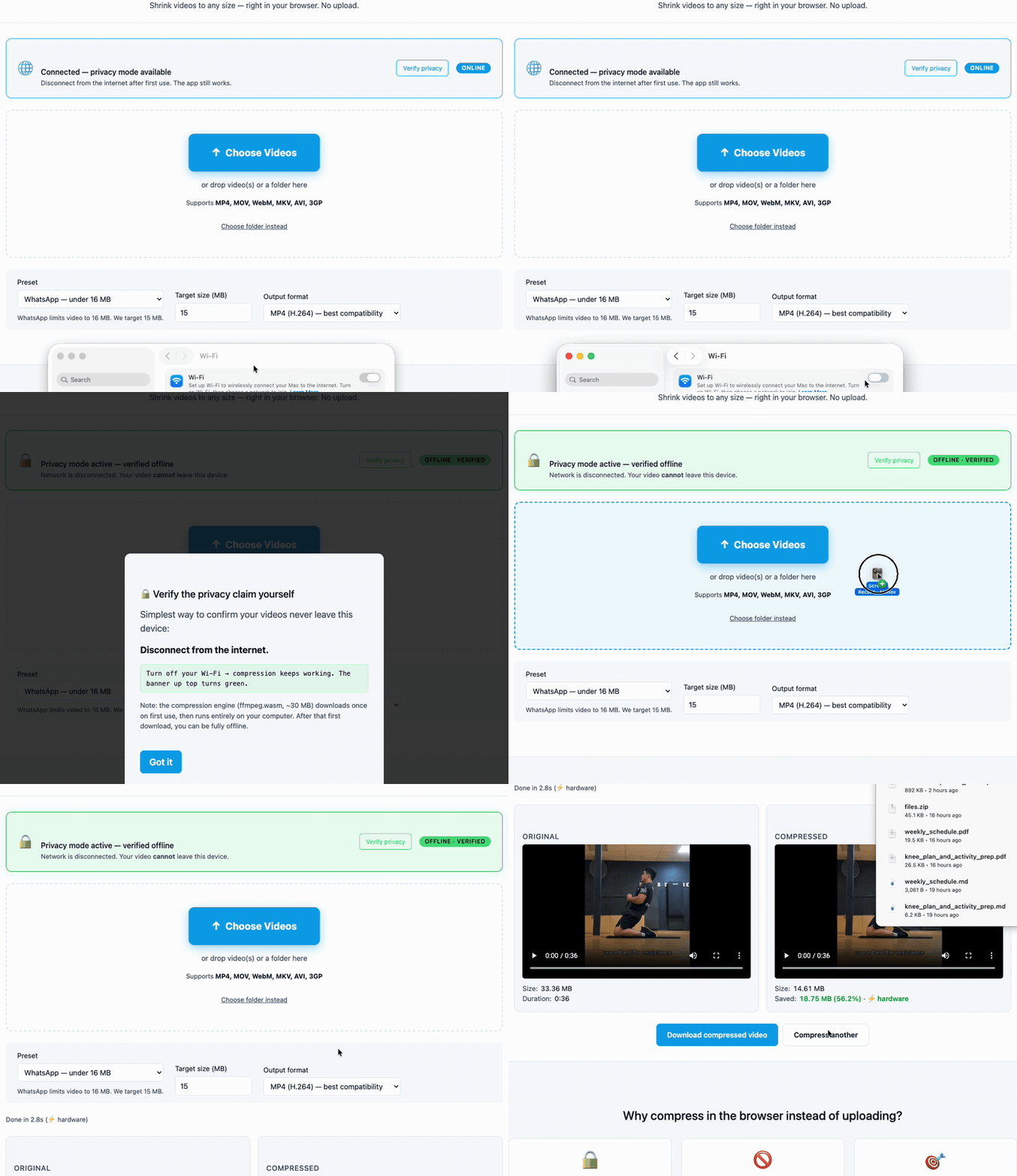
Simplest way to confirm your videos never leave this device:
Disconnect from the internet.
Note: a small one-time load happens on first use. After that, you can work fully offline.
or drop video(s) or a folder here
Supports MP4, MOV, WebM, MKV, AVI, 3GP — files of any size
Compression runs on your computer — not on someone else's server. Zero uploads. The other tools all send your video to their server first.
Drop a 4 GB drone clip if you want. We don't care. No "upgrade to compress files bigger than 100 MB" garbage.
Discord 10 MB. Email 20 MB. WhatsApp 16 MB. Reddit 100 MB. Pick a preset — we calculate the right bitrate to land just under the cap.
No upload wait. No queue. Compression starts the instant you drop the file. Modern browsers use hardware acceleration for an additional 5–10× speedup on supported devices.
Add to Home Screen — installs like an app. Compress those huge iPhone videos before texting them, no app store required.
The engine downloads once (~30 MB), then runs forever. Turn off Wi-Fi to prove it.
| This tool | Clideo | FreeConvert | VEED.io | |
|---|---|---|---|---|
| Video stays on your computer | ✓ Verifiable | Uploads to server | Uploads to server | Uploads to server |
| Free tier file-size limit | None | 500 MB | 1 GB | 1 GB (then signup) |
| Signup required | Never | Yes for output >500 MB | Watermark without account | Watermark on free |
| Watermark | Never | On free tier | On free tier | On free tier |
| Works offline | ✓ | No | No | No |
That's how you know nothing leaves your computer.
Clideo, FreeConvert, VEED, Adobe Express — they all send your video to a server. We don't. Compression runs on your CPU, in your browser, via the same ffmpeg engine VLC and YouTube use.
Yes — completely free, no premium tier, no signup, no watermark, no per-file paywall. There is no catch.
We're Essex Software, a 22-year-old software company. We sell paid desktop tools (PDF Merger, PDF Converter, others) — that's how we make money. Free browser tools like this one are how new customers find us. You owe us nothing for using it.
As big as your device can hold in memory. We've tested up to ~4 GB drone footage on a typical laptop. There is no server-side limit because there is no server.
Older or low-RAM devices may struggle past 1 GB. If you hit a wall, try the “Custom quality (CRF)” preset — it streams the file rather than buffering everything at once.
Nothing leaves your browser. The file is read into memory, compressed on your computer, and offered back to you as a download.
To verify: turn off your Wi-Fi after the page loads — compression keeps working.
The compression engine loads once on your first visit. Every compression after that — including all future visits — runs instantly without any download.
On modern browsers (Chrome/Edge/Safari recent versions), the tool also uses a hardware-accelerated path that's 5–10× faster than software encoding. The first compression auto-detects this and switches paths transparently.
It depends on your upload speed. On typical home internet (~30 Mbps up), a 500 MB video takes ~2 minutes just to upload to Clideo or VEED — then their server still has to compress it, then you wait again to download.
In-browser compression skips both the upload and the download. On a hardware-accelerated path it's almost always faster end-to-end. On software-only paths (older devices) it can be slower, but you trade time for privacy — nothing ever touches a server.
Chrome 89+, Edge 89+, Firefox 89+, Safari 15.4+. Works on Windows, Mac, Linux, ChromeOS, iPhone, iPad, and Android.
The hardware-accelerated fast path is available on Chrome, Edge, and recent Safari. Firefox falls back to the (still fully functional) software path.
Yes. Drop multiple files, or use “Choose folder instead” below the main button. Each file is compressed in sequence with a progress table. You can cancel any in-flight file or all remaining files at any point.
MP4 (H.264) for best compatibility — plays everywhere, including iMessage, WhatsApp, every video player. WebM for better compression at the same quality — useful for web embedding or when storage matters more than universal playback.
Input: MP4, MOV, WebM, MKV, AVI, 3GP, M4V, FLV, MPEG, MTS, and most other common video containers.
Probably. Browser support is the gate, not raw device power — if your phone runs a recent version of Safari (iOS 15.4+) or Chrome (Android 89+), the tool works. Compression speed scales with CPU, but the engine is the same.
For iPhone, “Add to Home Screen” in Safari makes it behave like a native app.
iOS, Android, macOS, Windows, or any modern browser — same tool, same code, same privacy.