
Best Scanner App for iPhone in 2026
Seven scanner apps compared on the things that actually matter — what they cost over five years, what they demand in return, and which type of user each one is genuinely the best for. Including the one that's already on your phone.
The 5-year cost comparison
Most scanner-app reviews focus on monthly price. The honest number is the 5-year total — that's roughly how long someone keeps a tool they actually use. Sticker price is misleading on subscriptions:
| App | Sticker | 5-year cost | Account? | Cloud upload? |
|---|---|---|---|---|
| Scaniva | $12.99 one-time | $12.99 | No | No |
| iOS Notes (built-in) | Free | $0 | No | iCloud (opt-in) |
| Microsoft Lens | Free | $0 | Microsoft | OneDrive default |
| Genius Scan | Free or $39.99/yr | $0 (free) / $200 (Pro) | No | No (free) / Yes (Pro) |
| Adobe Scan | Free w/ Adobe ID, $9.99/mo Pro | $0 (free) / $600 (Pro) | Adobe ID | Document Cloud |
| iScanner | ~$39.99/yr after trial | ~$200 | No | Cloud features paid |
| CamScanner | $4.99/wk or $49.99/yr | $250 (annual) / $1,297 (weekly) | Required | On by default |
If you're going to use a scanner for more than 2 months, the math heavily favors one-time pricing. Below is each app ranked by who it's actually best for.
The rankings
#1 — Best overall, best for "pay once and own it"
Scaniva
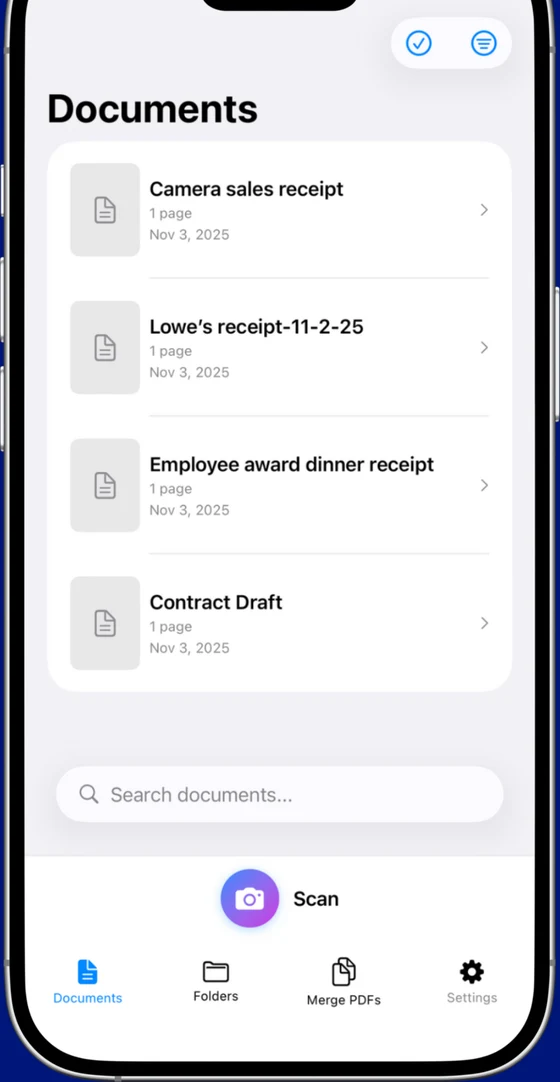
The cleanest match for what most people actually want from a scanner: edge detection, OCR, multi-page PDF, file compression, no monthly bill, no sign-in. Free tier covers your first 10 scans with OCR in all 14 languages; $12.99 once unlocks unlimited scans.
- True one-time pricing — no subscription, no auto-renew
- OCR in 14 languages, real searchable PDFs
- ~80% PDF compression for email/upload limits
- Receipt, business card, and ID scan modes
- Works fully offline — no cloud component to begin with
- From Essex Software, 22-year-old US developer (Charlotte, NC, A+ BBB)
- iOS only
- No cross-device sync (intentional — there's no cloud)
#2 — Best free option (if you don't need OCR)
Genius Scan
The veteran of the no-subscription scanner crowd. Most respected free tier in the category — no watermarks, no account, no cloud — but OCR was pulled into the paid plan a few years back. Pro ($39.99/yr) adds OCR and cloud sync.
- Genuinely usable free tier with clean exports
- Cross-platform (iOS + Android)
- Stable, mature, low-friction
- OCR is paid-tier only
- Annual subscription pricing if you need the Pro features
#3 — Best free with OCR (if you live in Microsoft 365)
Microsoft Lens
Free, includes OCR, integrates with Word/Excel/OneDrive. The defaults push everything into OneDrive — fine if you're already there, a real friction point if you're not. Can't be used at all without a Microsoft account.
- Genuinely free with OCR — no paid tier to upsell
- Excellent if you're inside Microsoft 365 already
- Microsoft account required just to open the app
- Pushes scans into Microsoft's cloud by default
#4 — Best OCR (if you're already paying for Acrobat)
Adobe Scan
Adobe's been doing OCR for 30 years, and it shows. Basic scanning and OCR are free with an Adobe ID; merging, editing, or compressing pushes you into a $9.99/month Acrobat subscription. Heavy commitment unless you're already on Creative Cloud.
- Best-in-class OCR quality
- Tight integration with Acrobat for editing PDFs
- Adobe ID required to open the app
- Premium features cost more than most subscription scanners
#5 — Best for "I'll only scan once a month"
iOS Notes (built-in)
The scanner that's already on your iPhone, hidden inside Notes (camera icon → Scan Documents). Same engine as most third-party apps under the hood (Apple's VisionKit). For occasional scans, the right answer is "you don't need another app."
- Already installed; zero friction
- Excellent image quality and edge detection
- Multi-page PDF out of the box
- No OCR — image PDFs only
- No compression — files can hit 30 MB
- No library — scans live inside whatever note you started from
- No scan modes (receipt, business card, ID)
#6 — Skippable: flashy but pricey
iScanner
Polished onboarding, slick interface, and one of the more aggressive subscription paywalls — the 3-day "free trial" converts to an annual plan unless you cancel. The headline features (object counting, measuring distances in scans) are niche.
- Well-rated, well-designed UI
- Niche measurement features
- Trial-to-annual conversion is a frequent App Store complaint
- Watermarks on free exports
#7 — Functional, but most users are leaving
CamScanner
The brand most people associate with phone scanning, mostly because it was first. The current experience — forced account, watermark on free tier, weekly subscription option — is what drives most "alternative" searches. Six alternatives compared →
- Mature feature set, cross-platform
- Direct sharing to many cloud services
- Required account; gates the camera button
- Watermark on free exports
- $4.99/week is among the most expensive scanner subscriptions
How we ranked these
Three weighted factors, in this order:
- Total 5-year cost — because most users keep their scanner choice that long, and subscription math compounds.
- Account / cloud requirements — because forced sign-in and auto-upload are the most common reasons people switch.
- Feature completeness — OCR, compression, scan modes, library. Once basics are equal, this is the tiebreaker.
Image quality and edge detection didn't enter the ranking, because — honestly — every app in the category is fine. They all wrap the iPhone camera with similar edge-detection logic. The differences are in pricing, friction, and the features around the scan.
The honest TL;DR
Scan once a month? Use Notes — don't install anything. Scan weekly and don't want a subscription? Scaniva. Already in Microsoft 365? Lens. Already on Creative Cloud? Adobe Scan. Genius Scan is the strong "free, no OCR" fallback if you only need image PDFs.
Scaniva — the one-time-purchase pick
OCR in 14 languages, ~80% PDF compression, no account, no subscription, no cloud. Free tier with 10 scans to start, $12.99 one-time to unlock unlimited.
Download on the App StoreFAQ
What is the best free scanner app for iPhone?
If "free" means "no payment ever," the built-in iOS scanner (inside Notes) is the simplest answer — no app to install, decent quality, no OCR. Among third-party apps: Microsoft Lens is free with a Microsoft account, Adobe Scan is free with an Adobe ID, and Genius Scan has a no-account free tier without OCR.
What is the best scanner app without a subscription?
Scaniva ($12.99 one-time) is the only widely-distributed iPhone scanner with traditional pay-once pricing and OCR included. Genius Scan's free tier is the no-payment-at-all alternative if you can skip OCR.
Is there a scanner app that doesn't need an account?
Scaniva, Genius Scan, iScanner, and the built-in iOS scanner all work without sign-in. CamScanner, Microsoft Lens, and Adobe Scan all require an account.
What's the best scanner app for receipts?
Any app with a dedicated "Receipt" scan mode (handles the long thin shape and B&W contrast better) — Scaniva, Adobe Scan, and CamScanner all have one. Specific receipt workflow here.
Do I need OCR?
If you'll ever search the document, copy a quote, or run it through accounting/contract software — yes. Image-only PDFs (Notes, free Genius Scan) are findable only by filename, which becomes painful at any volume.
Why do scanner subscriptions cost so much?
Because they can. The category is one of the more aggressive in app pricing — $4.99/week translates to $260/year. Most users don't notice until renewal #2 or #3. The one-time-pricing apps exist precisely because of this.
Will my scanner app work offline?
Scaniva, the built-in iOS scanner, and Genius Scan (free tier) all work offline. CamScanner, Microsoft Lens, and Adobe Scan require a network connection to sign in and upload — and many features only work online.