
TurboScan Alternatives — Modern Scanners That Still Charge Once
TurboScan got the business model right before almost anyone: pay once, scan forever, keep everything on your phone. But the app is showing its age. Here are six alternatives for people who want TurboScan's philosophy with 2026 features.
Why people are looking for an alternative
TurboScan (from Piksoft) is one of the oldest scanner apps on the App Store, and for years it was the recommendation for anyone who refused to rent their software. The pay-once model and local-only processing earned it a loyal user base. So why are longtime users shopping around?
- The feature set froze. TurboScan's core — scan, enhance, export PDF — still works. But the category moved on: multi-language OCR, dedicated receipt and ID modes, PDF merge and compression, batch workflows. TurboScan's minimalism starts to feel less like a philosophy and more like a snapshot of 2015.
- Update cadence slowed. Releases have become infrequent. On iOS that eventually matters — new screen sizes, camera APIs, and OS behaviors reward apps under active development.
- Text recognition is limited. If you need searchable PDFs in multiple languages, or accurate OCR on receipts and forms, TurboScan isn't where that bar is set anymore.
The good news: you don't have to give up the pay-once model to upgrade. That's the main thing this comparison sorts by.
What to look for in an alternative
If TurboScan's model is what you liked, four questions to ask about any replacement:
- Is it still a one-time purchase? Most of the category quietly switched to subscriptions. Check the actual pricing screen, not the marketing page.
- Do scans stay on the device? TurboScan never demanded a cloud account. Several popular alternatives do.
- Is OCR included, and in how many languages? This is where TurboScan lags furthest — and where the differences between alternatives are biggest.
- Is it actively developed? The reason you're leaving is the reason to check the update history of whatever you're joining.
The alternatives, ranked by who they're best for
1. Scaniva — best like-for-like upgrade
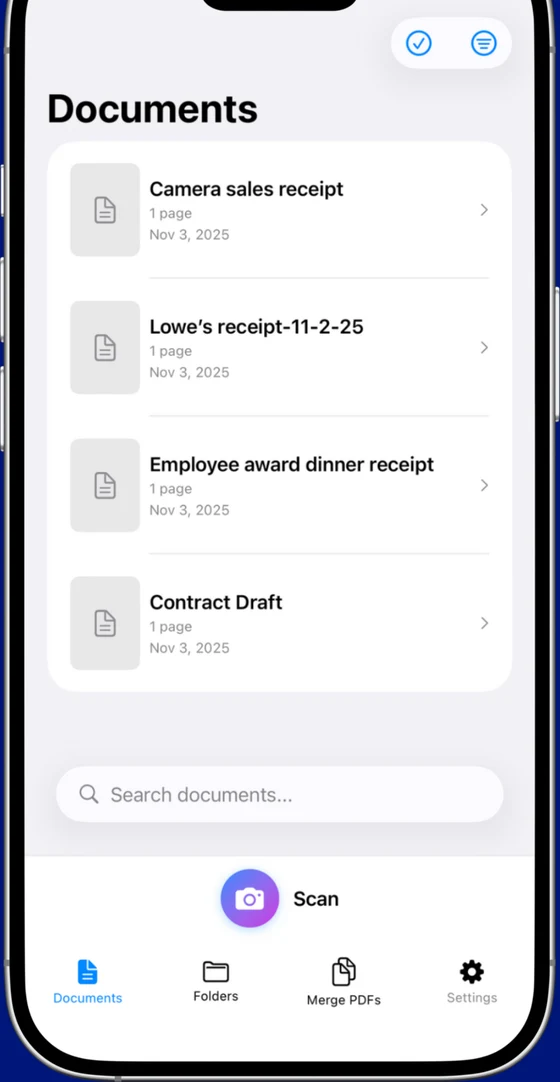
The same deal TurboScan made you — pay once, own it, nothing leaves your phone — with the modern feature set. Free tier includes 10 scans to start (no monthly reset) with OCR in all 14 languages and all 5 scan modes (documents, business cards, IDs, receipts, QR codes). Premium is a flat $12.99: unlimited scans, PDF merge and 80% compression, no subscription anywhere in the app.
- Identical philosophy: one-time purchase, offline, zero data collection
- 14-language OCR, merge, compression, receipt / ID / business-card modes — everything TurboScan skipped
- Actively developed by Essex Software (Charlotte, NC — 22 years in business, A+ BBB)
- iOS only (no Android)
- No cross-device sync (deliberate — there's no cloud)
2. Genius Scan — best free tier for basic scanning
The other veteran that respects its users. Genius Scan's free tier — no watermarks, no account, no forced cloud — covers TurboScan's core use case at zero cost. The catch: OCR lives in the $39.99/year Premium plan. If searchable PDFs don't matter to you, this is the cheapest serious option. If they do, the subscription math gets ugly fast.
- Genuinely usable free tier with clean exports
- Mature, stable, iOS + Android
- No OCR without the annual subscription
- Premium is recurring, not one-time
3. Microsoft Lens — best genuinely-free OCR
Free OCR with no premium tier — the only app on this list that gives away what others charge for. The trade: you need a Microsoft account, and the app is built to funnel scans into OneDrive. TurboScan users tend to bounce off exactly that, but if you're already in Microsoft 365 for work, it's the pragmatic pick.
- Free with OCR, no upsell anywhere
- Word / Excel / OneDrive integration
- Microsoft account required
- Cloud-first design — the opposite of TurboScan's local ethos
4. Adobe Scan — best OCR quality, heaviest strings
Adobe's OCR is excellent and the basic tier is free — but you sign in with an Adobe ID before you scan a single page, and the useful extras (edit, combine, password-protect) sit inside a $9.99/month Acrobat Premium subscription. For a TurboScan refugee who left because of bloat, this is trading one problem for a bigger one.
- Best-in-class OCR accuracy
- Free tier covers scan + export
- Adobe ID required just to open the app
- Premium costs more per month than TurboScan cost forever
5. iScanner — most features, most aggressive pricing
Slick, feature-packed (object counting, measuring, e-signatures), heavily advertised — and built around a 3-day trial that auto-converts to an annual subscription if you don't cancel in time. The pricing model is the exact thing TurboScan users organized their lives to avoid. Enter with eyes open.
- Polished interface, broad feature set
- Well-rated by users who stay past the trial
- Trial-to-annual auto-conversion catches people constantly
- Watermarks on free exports
6. The built-in iOS scanner — best for one-offs
iOS Notes and Files both include a "Scan Document" function — free, local, no watermark. No OCR, no organization, no receipt or ID modes, but if your scanning needs shrank to a page or two a year, you may not need a scanner app at all anymore.
The honest TL;DR
If you picked TurboScan for the pay-once model and want that deal with current features — Scaniva is the direct successor at $12.99 once. If you just need occasional basic scans, Genius Scan's free tier or the built-in iOS scanner cost nothing. If you need free OCR and can live inside Microsoft's cloud, Lens. Everything else on the list wants a monthly relationship you were specifically avoiding.
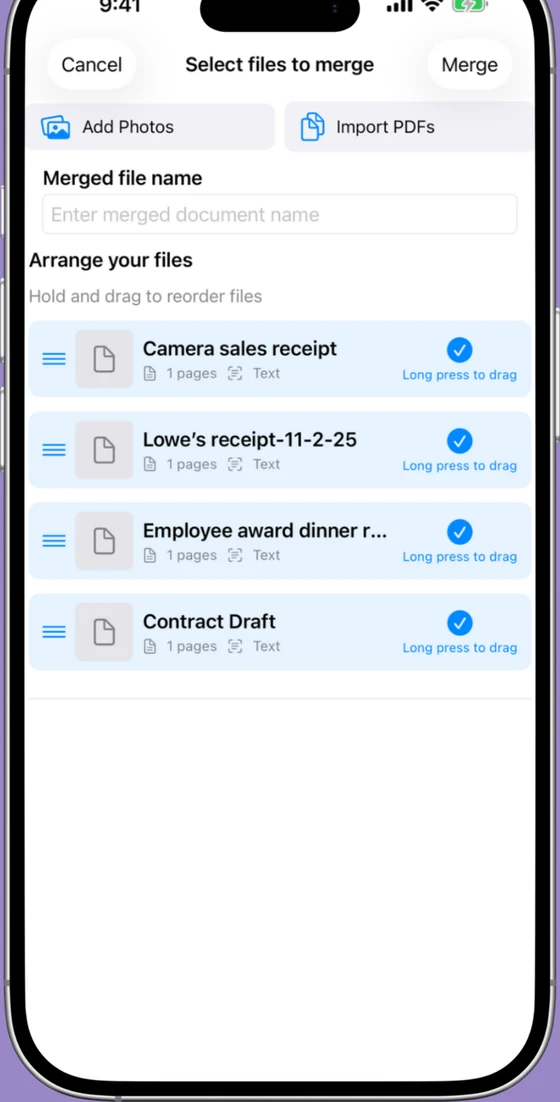
Try Scaniva — TurboScan's deal, 2026's features
Free tier with OCR, works fully offline, $12.99 one-time to unlock unlimited. The pay-once scanner, brought up to date.
Download on the App StoreFAQ
Is TurboScan still a one-time purchase?
Yes — TurboScan Pro remains a one-time purchase, which is exactly why its users are picky about replacements. If you're leaving, it's usually for features and development pace, not pricing. Scaniva keeps the same one-time model ($12.99) with a modern feature set.
Does TurboScan have OCR?
TurboScan's text recognition is limited compared to current apps. If you need searchable PDFs across multiple languages — or reliable OCR on receipts, forms, and IDs — that's the main reason to move to something like Scaniva (14 languages) or Adobe Scan.
Is TurboScan still being updated?
The app still works and receives occasional maintenance, but the pace of feature development has visibly slowed compared to the category. That's not fatal today; it's the trend line people are reacting to.
What's the closest app to TurboScan's philosophy?
Scaniva. One-time purchase, no account, no cloud, works offline — the same principles, executed with 2026 features (multi-language OCR, PDF merge, compression, dedicated scan modes). Genius Scan's free tier is the runner-up if you don't need OCR.
What's the cheapest scanner app long-term?
Over 5 years: the built-in iOS scanner is $0 (no OCR), Scaniva is $12.99 total, Genius Scan Premium is $200, iScanner is $200, Adobe's Acrobat Premium is $600. One-time pricing wins unless your needs are trivial.