
The Best Free Scanner Apps for iPhone — Which Are Actually Free
"Free" is the most overloaded word in the App Store. Most free scan apps that show up under that filter aren't free in any way that matters — they're three-day trials with a $39/year auto-renew baked in. Here's what to actually look for, and which document scanner apps deliver on the promise.
What "free" should actually mean
If you're searching for a free document scanner, there are really three things you probably want:
- No card on file. You shouldn't have to enter payment details, accept a trial, or dismiss a subscription wall before you scan a single page.
- No watermark or footer stamped across the PDF you export — or at least one you can live with.
- No cloud account. Your driver's license, lease, and tax forms shouldn't have to land on someone else's server just to come out as a PDF.
Almost no scanner app on the App Store hits all three. The category got captured by subscription pricing somewhere around 2019, and most of the top results today are variations on the same model: a paywall in front of the camera button, a 3-day trial, and a $4.99-per-week auto-renew you'll forget to cancel.
The freemium trap
"Free" in the App Store often means "free to download." That's not the same as free to use. If an app demands a subscription before you've completed your first scan — or watermarks the output until you upgrade — it's not a free scanner. It's a trial.
How we evaluated each app
We installed each one fresh on a clean iPhone, declined all upgrade prompts, and tried to do four common tasks:
- Scan a single-page document (receipt) and export it as a PDF.
- Scan a multi-page document (lease agreement) and merge it.
- Run OCR on a printed page and copy the text out.
- Export the result without creating an account or accepting a trial.
If any of those required a paid plan, that's worth knowing up front.
The honest free-tier comparison
| App | Real free tier? | Watermark? | Account? | Paid plan |
|---|---|---|---|---|
| CamScanner | Limited | Yes, on exports | Required for sync | ~$4.99/wk or ~$49/yr |
| Adobe Scan | Yes | No | Adobe ID required | $9.99/mo for Acrobat Premium features |
| iScanner | Trial only | Yes | Optional | ~$39.99/yr |
| Genius Scan | Yes (no OCR) | No | Not required | $7.99/mo or $39.99/yr for OCR and cloud |
| Microsoft Lens | Yes | No | Microsoft account | Free |
| Scaniva | Yes, with OCR | Small footer (free tier only) | Not required | $12.99 one-time (no subscription) |
A few things stand out. CamScanner and iScanner aren't really free — they're trials in disguise. Adobe Scan and Microsoft Lens are genuinely free, but both require you to sign in with a corporate account, and Adobe's product page actively cross-sells you into a $9.99/month Acrobat subscription the moment you try to do anything beyond basic scanning. Genius Scan is the only legacy app that still respects "free" as a tier, but it strips OCR out of it — so you can scan, but you can't search.
What we recommend
If you scan once a week or less
Microsoft Lens if you already live in the Microsoft ecosystem (it dumps straight into OneDrive). Otherwise, Genius Scan for the no-account experience — just accept you won't get OCR on the free tier.
If you scan a few times a week
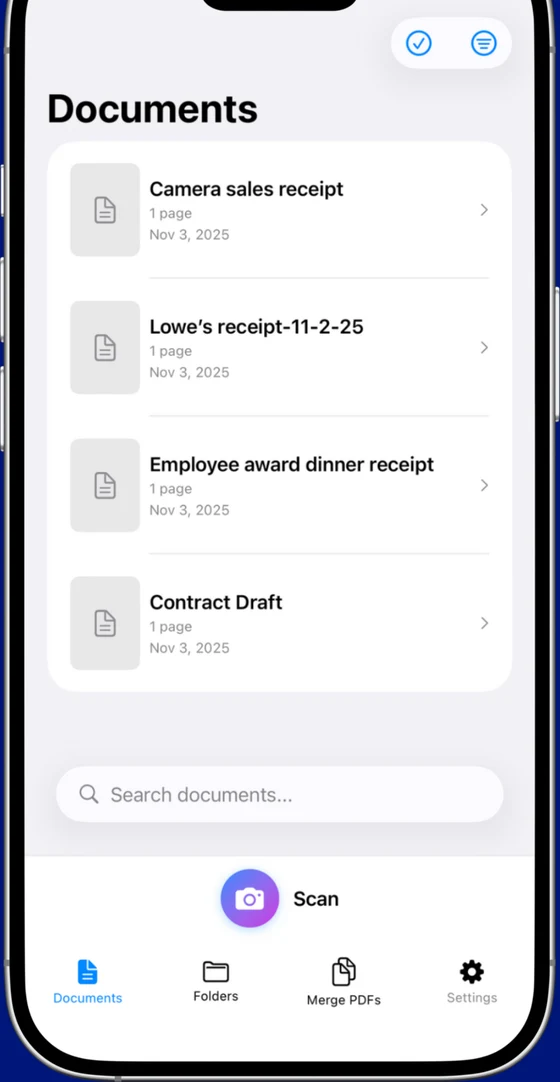
Scaniva. The free tier includes 10 scans to start (no monthly reset) with OCR in all 14 languages, all five scan modes (documents, business cards, ID cards, receipts, QR codes), and exports without uploading anything to a server. If you outgrow it, the upgrade is a one-time $12.99 — no recurring charge, no Adobe ID, no cloud account.
This is the part most reviewers miss: the only scanner app on this list where "premium" is a $12.99 line item instead of a $39–$120/year subscription is Scaniva. Over five years that's the difference between paying $12.99 and paying $250–$600 for the same set of features.
If you need everything, every day
If you're processing hundreds of pages a month for accounting, legal, or insurance work, you're past the consumer tier. Adobe Scan tied to a real Acrobat subscription is a legitimate workflow because the editing tools justify the cost. For everyone else, that subscription is overkill.
Try Scaniva free — no card, no account
10 scans to start with OCR in all 14 languages, all 5 scan modes, fully offline. If you like it, $12.99 one-time unlocks unlimited.
Download on the App StoreHow to spot the freemium trap before you install
A few signals to look for in the App Store listing itself:
- "In-App Purchases" with weekly pricing ($4.99/week is the standard for these). Weekly pricing exists for one reason: to make the annual cost ($259/year) less obvious at checkout.
- "Free Trial" language in the screenshots. Apple requires trial disclosure, so it'll be in there — usually 3 or 7 days. If the screenshots mention a trial, the app is a subscription, full stop.
- Reviews mentioning watermarks. If three of the first ten reviews complain about watermarks on exports, you're not getting a clean PDF on the free tier.
- "Sign in" requirement on first launch. Adobe Scan, Microsoft Lens, and CamScanner all gate the camera behind an account. Genius Scan and Scaniva don't.
FAQ
Is there a totally free iPhone scanner with OCR and no watermark?
Yes — Scaniva's free tier includes OCR in all 14 languages and exports with only a small footer. Genius Scan also exports without a watermark but doesn't include OCR on the free tier. Microsoft Lens is fully free with OCR but requires a Microsoft account.
What's the difference between "free" and "free trial"?
A free trial requires a credit card and auto-converts to a subscription after 3–7 days. If you forget to cancel, you're billed. A genuinely free tier doesn't require payment information at all. Always check the in-app purchase section before installing.
Does Apple's built-in Notes app count as a scanner?
For a single page, yes — Notes will detect a document and crop it for you. It doesn't do OCR, multi-page PDF management, batch scanning, business cards, IDs, or receipts as separate modes, and it doesn't compress. Fine for occasional one-pagers. Not a real workflow.
Does iPhone's Files app scan documents?
Yes, in iOS 16+ — tap the three dots and choose "Scan Documents." Same limitations as Notes: no OCR, no batch, no organization. It's a feature, not a product.
What about privacy? Where do scans actually go?
Most scanner apps default to uploading scans to the developer's cloud (CamScanner, Adobe Scan, iScanner). Genius Scan can be configured to stay local. Scaniva is local-only by design — there's no cloud sync option because there's no server.