
CamScanner Alternatives That Don't Require an Account
Six scanner apps compared on the things that actually matter: what they cost over time, whether they need an account, where your scans end up, and what the watermark situation looks like.
Why people are looking for an alternative
CamScanner is still functional and still has a huge user base, but the experience has drifted over the years. The three friction points that show up over and over again in App Store reviews:
- Forced account. You can't get past the camera button without a CamScanner account, and the account exists to enable cloud sync, which is on by default.
- Watermarks on the free tier. Exports get a small "scanned with CamScanner" stamp until you pay.
- Recurring pricing. CamScanner Premium runs roughly $4.99/week or $49.99/year. If you scan once a month, you're paying ~$50/year for a few minutes of total usage.
None of those are deal-breakers by themselves. Together they're enough to make a lot of users go looking. Here's what the alternatives actually offer.
What to look for in an alternative
Before the comparisons, four questions worth asking about whatever you switch to:
- Is there a real free tier, or just a trial? "Free with in-app purchases" can mean either — our guide to genuinely free scanner apps for iPhone breaks down which is which.
- Does it require an account? Some scanners gate the camera behind a Microsoft / Adobe / Google sign-in.
- Where do scans go by default? Local-only vs auto-uploaded to the developer's cloud is a real difference for sensitive documents.
- Is the pricing recurring or one-time? Over 5 years, a $4.99/week subscription is $1,297. A $12.99 one-time app is $12.99.
The alternatives, ranked by who they're best for
1. Scaniva, best for "one and done" buyers
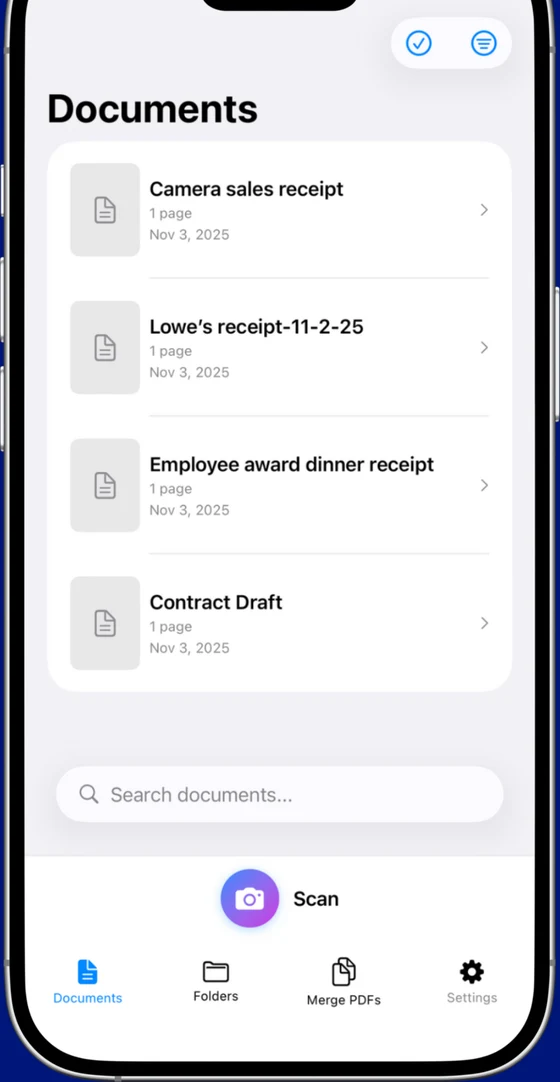
The closest thing to old-style "buy an app and use it forever" pricing in the scanner category. Free tier includes 10 scans to start (no monthly reset) with OCR in all 14 languages, all 5 scan modes, and exports without uploading anywhere. Premium is a flat $12.99 to remove the limits, no subscription, no Adobe ID, no cloud sync.
- 14-language OCR, PDF merge, 80% compression, business card / ID / receipt scan modes
- Works fully offline, there's no server because there's no cloud component
- From Essex Software, an established US developer (Charlotte, NC, 22 years in business, A+ BBB)
- iOS only (no Android)
- No cross-device sync (intentional, there's no cloud)
2. Genius Scan, best for free-tier purists
The veteran of the no-subscription scanner crowd. Genius Scan has the most respected free tier in the category, no watermarks, no account, no cloud upload, but they pulled OCR into the paid plan a few years back. Premium is $39.99/year and adds OCR, cloud sync, and batch features.
- Genuinely usable free tier with clean exports
- Mature app, very stable, iOS + Android
- No OCR on free tier
- Premium is annual subscription, not one-time
3. Microsoft Lens, best if you already use OneDrive
Microsoft's free scanner app. The catch is that it's really designed to be a front-end for OneDrive, scans default to syncing there, and you need a Microsoft account to use it at all. If you're already in the Microsoft ecosystem for work, this is a no-brainer. If you're not, the sign-in friction is real.
- Genuinely free with OCR, no paid tier to upsell you
- Direct OneDrive, Word, and Excel integration
- Microsoft account required
- Defaults push everything into Microsoft's cloud
4. Adobe Scan, best for heavy Acrobat users
Adobe's free scanner. Basic scanning, OCR, and PDF export are free, but the moment you want to edit, combine PDFs from outside the app, or use any "premium" feature, you're inside a $9.99/month Acrobat Premium subscription. For a graphic designer who's already paying for Creative Cloud, fine. For everyone else, it's a heavy commitment.
- Excellent OCR quality (Adobe's been doing this for 30 years)
- Free tier is genuinely usable for scanning
- Adobe ID required just to open the app
- Premium features cost more than most subscription scanners
5. iScanner, flashy but expensive
Heavy advertising presence, slick onboarding, and one of the more aggressive subscription paywalls, the 3-day "free trial" auto-converts to an annual plan if you don't cancel. The feature set is competitive (counting objects in scans, measuring distances) but you're paying for that.
- Polished interface, well-rated
- Niche features like object counting and measurement
- Free trial converts to annual, easy to forget to cancel
- Watermarks on free exports
6. The built-in iOS scanner, best for one-offs
Often overlooked: iOS Notes and Files both have a "Scan Document" function built in. No app to install, no account, no watermark. The downside is there's no OCR, no batch organization, no business-card or receipt modes, and you're managing scans as raw files. Fine for the rare one-page scan; not a workflow.
The honest TL;DR
If you scan a lot, hate subscriptions, and don't need cross-device sync, Scaniva is the cleanest fit at $12.99 once. If OCR isn't important to you, Genius Scan's free tier is hard to beat. If you live inside Microsoft 365 already, Microsoft Lens is free and integrated. Everything else either costs more over time or asks for more of your data than it needs to.
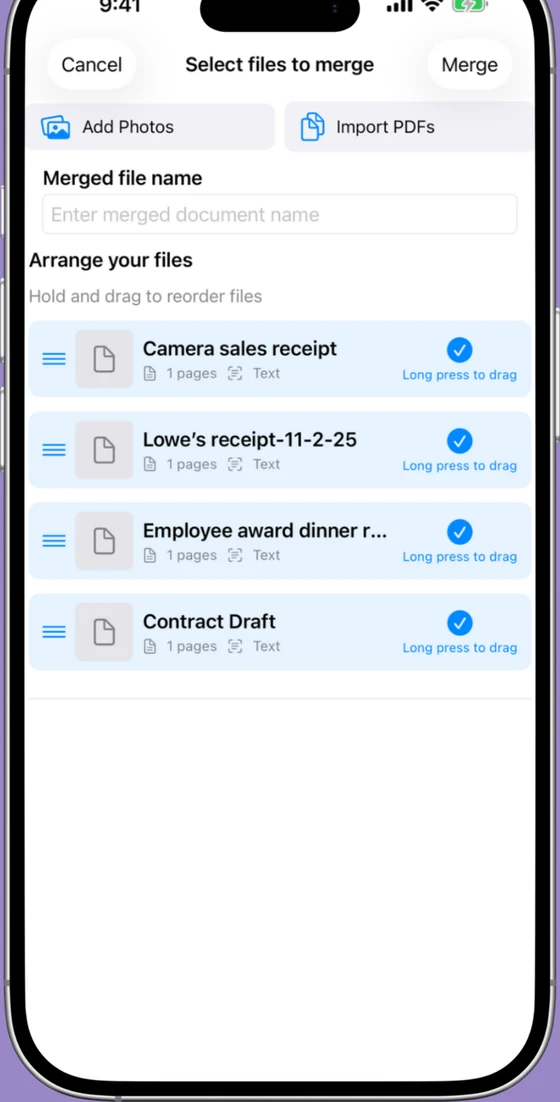
Try Scaniva, no account, no subscription
Free tier with OCR, full feature set offline, $12.99 one-time to unlock unlimited. The actual "pay once, own it" model, applied to scanner apps.
 On desktop? Scan to install on your iPhone.
FAQ
Is there a free CamScanner alternative with no watermark?
Genius Scan (free tier, no OCR), Microsoft Lens (free, needs Microsoft account), and Adobe Scan (free, needs Adobe ID) all export without watermarks. Scaniva's free tier has a small footer; the $12.99 premium removes it.
What CamScanner alternative doesn't need an account?
Genius Scan, Scaniva, iScanner, and the built-in iOS scanner all work without creating an account. Microsoft Lens and Adobe Scan require sign-in.
Is CamScanner safe to use in 2026?
CamScanner is functional and widely used. There was a malware incident in 2019 that got resolved, but the underlying friction, required account, watermark on free tier, recurring pricing, is what most people end up wanting to leave. Safety isn't usually the reason; ergonomics is.
What's the cheapest scanner app long-term?
Over 5 years, a $12.99 one-time app like Scaniva costs $12.99. A $39.99/year subscription is $200. A $4.99/week subscription is $1,297. If you're going to use the app for more than 6 months, the math heavily favors one-time pricing.
Is there an Android equivalent of any of these?
Genius Scan, Microsoft Lens, Adobe Scan, iScanner, and CamScanner all have Android versions. Scaniva is currently iOS-only.