
Scanner Pro Alternatives Without a Subscription
Scanner Pro was one of the first premium iPhone scanners — and one of the best. Then it went subscription. Here are six honest alternatives compared on what they actually cost, where your scans go, and whether the app still respects that you paid.
Why people are looking for an alternative
Readdle's Scanner Pro launched in 2010 as a one-time purchase and quickly became the reference iOS document scanner. In 2019 it shifted to a subscription model — Scanner Pro Premium — which is where most of the current search traffic for "Scanner Pro alternative" comes from. Three points come up over and over:
- The subscription pivot. If you bought Scanner Pro years ago expecting to own it, the current version pushes you toward a Premium plan (roughly $29.99/year) to unlock OCR, workflow automations, and unlimited cloud sync.
- Readdle ecosystem gravity. Premium ties into Readdle Cloud, Documents by Readdle, and Spark. Convenient if you're all-in on that stack; friction if you're not.
- Free tier limits are strict. The free build handles basic scanning, but the features Scanner Pro is famous for — high-quality OCR, batch scanning, workflow shortcuts — sit behind the paywall.
None of those are wrong by themselves. Together they're enough to make longtime users go looking. Here's what the alternatives actually offer.
What to look for in an alternative
Before the comparisons, four questions worth asking about whatever you replace Scanner Pro with:
- Is it a real one-time purchase, or a "lifetime" subscription? Marketing pages love the word "lifetime." Read the pricing screen.
- Does OCR come free, or is it the upsell? Scanner Pro moved OCR into Premium. Some alternatives keep it in the free tier; others follow the same playbook.
- Where do scans live by default? Local vs auto-uploaded to the developer's cloud matters for anything sensitive — contracts, IDs, tax forms.
- How much would you actually pay over 5 years? A $29.99/year subscription is $150. A $12.99 one-time app is $12.99. Multiply the small numbers, they add up.
The alternatives, ranked by who they're best for
1. Scaniva — best for "buy it once, own it" buyers
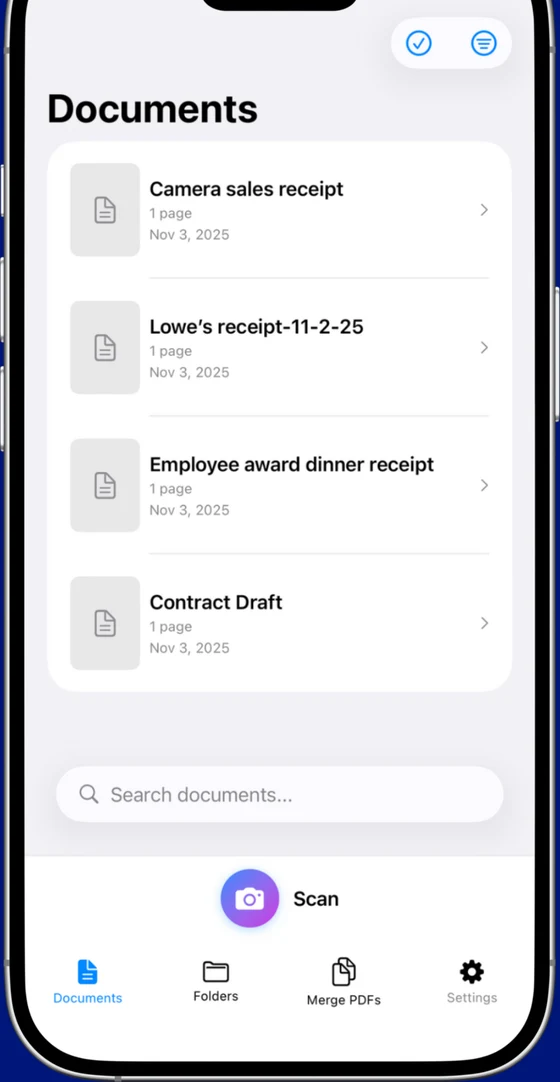
The closest thing to old-Scanner-Pro pricing in the current App Store. Free tier includes 10 scans to start (no monthly reset) with OCR in all 14 languages, all 5 scan modes (documents, business cards, IDs, receipts, QR), and exports without uploading anywhere. Premium is a flat $12.99 to remove the limits — no subscription, no Readdle Cloud, no auto-renew to forget about.
- 14-language OCR, PDF merge, 80% compression, receipt / ID / business card modes
- Works fully offline — there's no server because there's no cloud component
- From Essex Software, a US developer (Charlotte, NC, 22 years in business, A+ BBB)
- iOS only (no Android)
- No cross-device sync (deliberate — there's no cloud)
2. Genius Scan — best for free-tier purists
The other longtime resident of the "we do scanning without punishing you" corner. Genius Scan's free tier is clean — no watermarks, no forced sign-in, no cloud upload — but they pulled OCR into the paid plan a few years back. Premium is $39.99/year and adds OCR, cloud sync, and batch features. If OCR isn't a hard requirement, the free tier gets you further than Scanner Pro's does.
- Genuinely usable free tier with clean exports
- Mature app, very stable, iOS + Android
- No OCR on free tier
- Premium is annual subscription, not one-time
3. Microsoft Lens — best if you already use OneDrive
Microsoft's free scanner app. Genuine free — no Premium tier hanging over your head — but really designed as a front-end for OneDrive. You need a Microsoft account to use it at all, and scans want to sync into OneDrive by default. If you're a 365 user, this is basically Scanner Pro Premium's workflow automation for free.
- Free with OCR, no paid tier to upsell you
- Direct OneDrive, Word, and Excel integration
- Microsoft account required
- Defaults push everything into Microsoft's cloud
4. Adobe Scan — best for heavy Acrobat users
Adobe's take on the scanner category. Basic scanning, OCR, and PDF export are free — but every "premium" feature (edit, combine PDFs from outside the app, protect with a password) drops you into a $9.99/month Acrobat Premium subscription. Excellent OCR quality; heavy commitment if you don't already live in Adobe's world.
- OCR quality is among the best in the category
- Free tier is genuinely usable for scanning + basic PDF
- Adobe ID required just to open the app
- Acrobat Premium is more expensive than most subscription scanners
5. CamScanner — most-installed, most-friction
The biggest scanner app by install base, and probably the one you'd pick if you didn't know Scanner Pro existed. The trade-offs are well-known by now: forced account creation, "scanned with CamScanner" watermark on free exports, and Premium pricing around $4.99/week or $49.99/year. Feature-rich, but the app is trying to become a platform.
- Very complete feature set (OCR, e-signature, cloud sync)
- iOS + Android + web dashboard
- Account required to get past the camera screen
- Watermark on free-tier exports until you subscribe
6. The built-in iOS scanner — best for one-offs
Often overlooked: iOS Notes and Files both have a "Scan Document" function built in. No app to install, no subscription, no watermark. The downside is no OCR, no batch organization, no receipt or business-card modes, and you're managing scans as loose files. Great for the rare one-page scan; not a replacement workflow.
The honest TL;DR
If you liked Scanner Pro's philosophy back when it was a one-time purchase — Scaniva is the closest fit at $12.99 once. If you rarely need OCR and just want the free tier that respects you, Genius Scan is hard to beat. If you're already in Microsoft 365, Microsoft Lens is a free workflow tool. Everything else either costs more over time or asks for more of your data than a scanner needs.
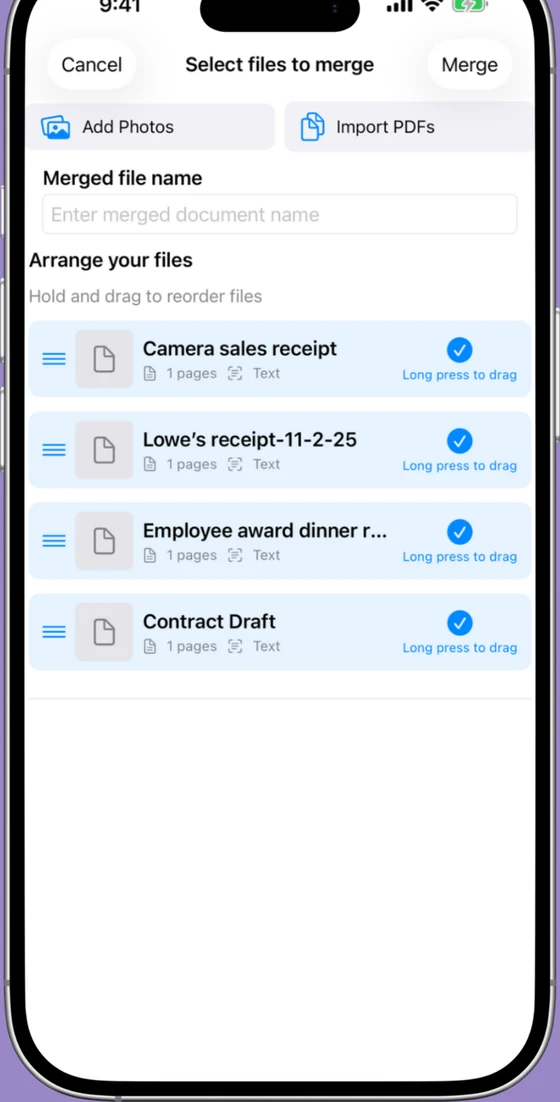
Try Scaniva — pay once, own it
Free tier with OCR, full feature set offline, $12.99 one-time to unlock unlimited. The "buy an app and use it forever" model — applied to scanner apps in 2026.
Download on the App StoreFAQ
Is there a one-time purchase Scanner Pro alternative?
Yes. Scaniva ($12.99) is currently the closest thing to old-model Scanner Pro pricing on iOS. Free tier with OCR up front, one payment to unlock unlimited, no subscription. Genius Scan is free with paid OCR; the built-in iOS scanner in Notes/Files is free with no OCR at all.
Why did Scanner Pro go subscription?
Readdle moved Scanner Pro to a subscription model in 2019, following an industry-wide shift among premium iOS utility apps. The business logic — recurring revenue funds ongoing development — is real. Whether it's the right fit for a scanner app you use twice a month is a separate question.
Can I still use the older paid version of Scanner Pro?
If you bought Scanner Pro before the subscription transition and never updated past that build, technically yes — App Store keeps old purchases restorable. In practice, older builds stop getting iOS compatibility updates and eventually break on new phones. That's what pushes most users to look for a replacement rather than a fossil.
What's the cheapest scanner app for iPhone long-term?
Over 5 years, a $12.99 one-time app like Scaniva costs $12.99. A $29.99/year Scanner Pro Premium subscription is $150. A $39.99/year Genius Scan is $200. A $4.99/week CamScanner Premium is $1,297. If you'll use a scanner for more than 6 months, one-time pricing wins by a lot.
Does Scanner Pro work offline?
Basic scanning and PDF export work offline. OCR, Readdle Cloud sync, and workflow automations require an internet connection — and Premium. If you want a scanner that does the full job with the plane in airplane mode, choose a local-only alternative like Scaniva or Genius Scan's free tier.